
 Nodaro Docs
Subway FOOH Studio
A product photo, a line on your brand and a city name in; your poster on a metro platform out — then the product bursts out of the lightbox, three metres…
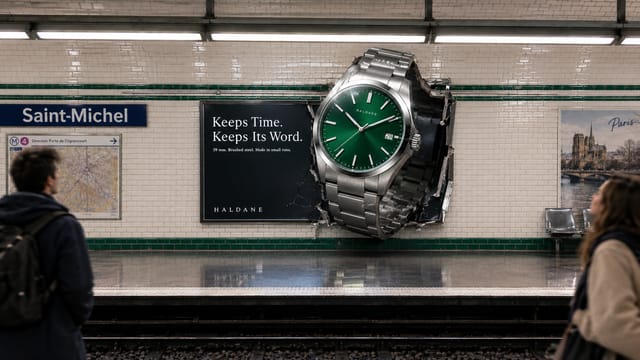
Subway FOOH Studio is a ready-made Nodaro workflow in static ads. A product photo, a line on your brand and a city name in; your poster on a metro platform out — then the product bursts out of the lightbox, three metres tall, as a photoreal still and a 4-second clip. The out-of-home stunt that never happened, in that city's signature metro style.
| Category | Static ads |
| Makes | images and video |
| Models | GPT Image 2, seedance |
| Nodes | 9 |
| Estimated cost of one run | About 102 credits, the price of its models when the template was saved |
| Level | Advanced |
Open Subway FOOH Studio in Nodaro
How it works
Subway FOOH Studio
A product photo, a line on your brand and a city name become your poster on a metro platform — and then the product bursts out of the poster, giant, as a still and as a clip. FOOH: the out-of-home stunt that never happened, filmed as if it did. The station takes the signature look of the city you name.
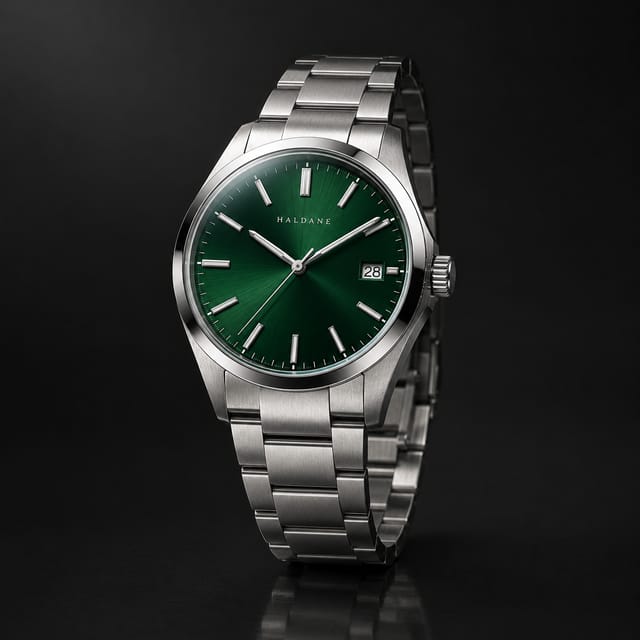
- Product photo — a clean packshot. The hero of the poster and of the burst.
- Brand notes — the brand name, the product, who it is for, the tone. One line you like helps.
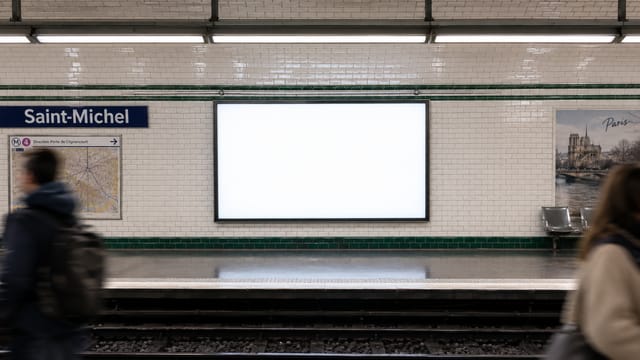
- City — Paris, Berlin, Tokyo, New York… the station takes that city's tiles, signage and light.
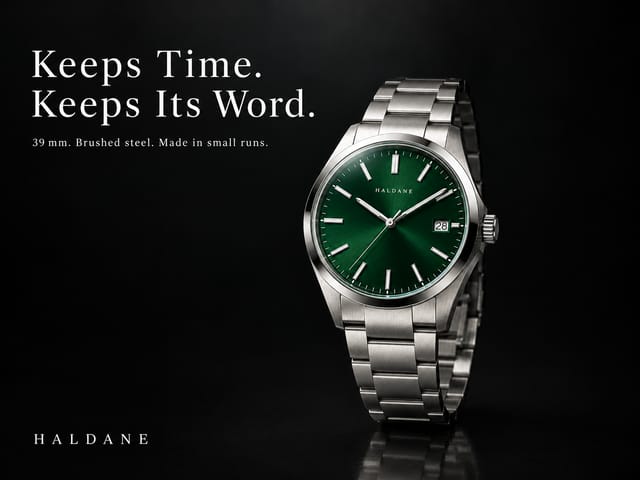
- Poster brief — an AI creative director writes the headline, the wordmark and the look. Edit it by hand and rerun the poster.
- Poster + Station — the poster renders from the brief; the station renders from the city name alone, with a blank lightbox waiting.
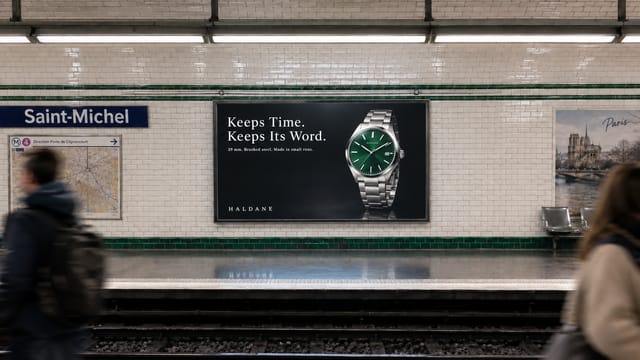
- Subway mockup — the poster printed in the lightbox, in the station's perspective and light.
- FOOH still — the product bursts out of the lightbox, three metres tall, with real shadows and reflections.
- FOOH clip — 4 seconds from the flat poster to the burst, pinned to both frames.
Step by step
Step 1
A clean packshot on a plain background. The poster and the burst both get it as a reference, so the shape, the materials, the markings and the colours come through unchanged.
Step 2
The brand name (spelled the way it should print), what the product is, who it is for, the tone — and a line you like, if you have one. The creative director uses only what is here; nothing gets invented.
Step 3
Just the name. The station is generated in that city's signature metro style — tiles, signage, colours, light — with a small detail that gives it away. Swap the city and rerun everything from the station on.
Steps 4–5
The brief comes in a fixed shape — headline, small line, wordmark, look — so the poster renders the words exactly as written; edit it by hand and rerun the poster. The station renders in parallel from the city name, framed straight across the tracks with a blank backlit lightbox at dead centre — the empty slot the poster will fill.
Step 6
The poster and the station go in together; the station comes back untouched with the poster printed in the lightbox — perspective, backlight and a faint reflection included. This is also the first frame of the clip.
Step 8
4 seconds pinned to two frames: the mockup first, the FOOH still last. The poster ripples, the product pushes out and swells to full size, and the clip lands exactly on the still. This is the format people actually post.
Step 7
The mockup and the packshot go in; the station comes back with the product burst out of the lightbox as a giant object over the tracks — shadow on the tiles, reflection on the floor, commuters looking up. Rerun this node alone for another take; it is the last frame of the clip.
What it made
Results that the template made in Nodaro. Your results follow your own inputs.
Nodes in this template
The template is a workflow of 9 nodes. Each node below links to its page:
- Generate Image: 4
- Text: 2
- Generate Video: 1
- Prompt: 1
- Upload Image: 1
Use this template
- Open the template in Nodaro and click Clone & customize. Nodaro copies it into My Workflows.
- Replace the inputs with your own: Product photo.
- Click Run. The editor shows the price before anything runs.
Templates lists every template, and Choosing a model helps when you swap a model.
Frequently asked questions
What does the Subway FOOH Studio template make?
A product photo, a line on your brand and a city name in; your poster on a metro platform out — then the product bursts out of the lightbox, three metres tall, as a photoreal still and a 4-second clip. The out-of-home stunt that never happened, in that city's signature metro style.
How much does one run of Subway FOOH Studio cost?
About 102 credits, the price of its models when the template was saved. The editor shows the current price before you run it, and you pay only for the nodes that run.
Which models does Subway FOOH Studio use?
GPT Image 2 and seedance. You can switch any of them on the canvas after you clone the template.
Do I need to build a workflow to use Subway FOOH Studio?
No. Clone the template, replace its inputs with your own and click Run. The workflow is already built and connected.
Related
Static ad templates
Ad A/B Studio
Ad Funnel Studio
Ad Localizer Studio
Ad Motion Studio
Last updated on
Product Ad Set Studio
A product photo, brand notes and a short brief in; three ads on three angles out — hero, benefit, scene — each as a 9:16 story and a 1:1 feed post, six…
Timeline Ad Studio
A product photo and its benefits in, three timeline ads out — the direct-response format that shows results building over time (Day 1, Week 4, Month 3) — each…