
 Nodaro Docs
Competitor Ad Studio
A rival's winning ad, your packshot and your brand notes in; your own ad out — the same trick, layout and copy pattern, your product exactly as photographed,…
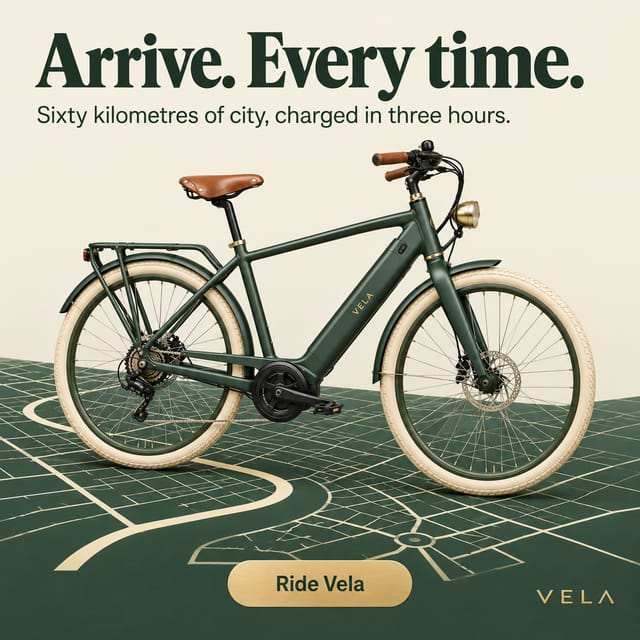
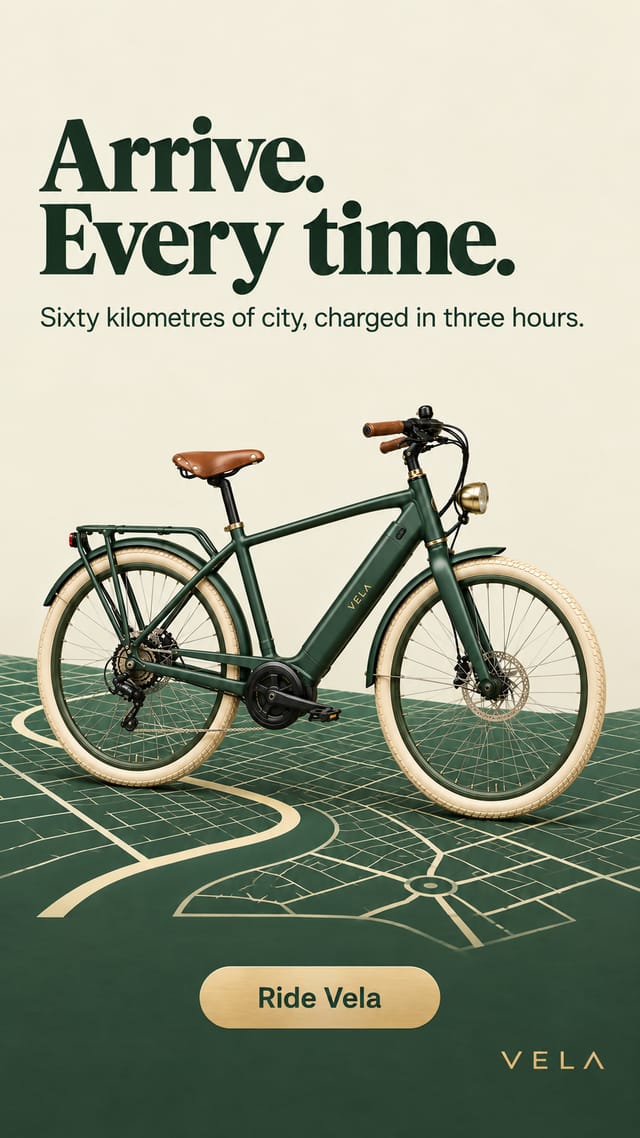
Competitor Ad Studio is a ready-made Nodaro workflow in static ads. A rival's winning ad, your packshot and your brand notes in; your own ad out — the same trick, layout and copy pattern, your product exactly as photographed, your facts, your colours — as a square feed post and a 9:16 story, with the rival's structure explained in five editable lines.
| Category | Static ads |
| Makes | images |
| Models | GPT Image 2 |
| Nodes | 7 |
| Estimated cost of one run | About 34 credits, the price of its models when the template was saved |
| Level | Intermediate |
Open Competitor Ad Studio in Nodaro
How it works
Competitor Ad Studio
A rival's winning ad, your packshot and your brand notes become your own ad — the same trick, layout and copy pattern, your product, your facts, your colours — as a feed post and a story. The rival's ad is read for structure only; none of its words, logo or brand carry over.
- Rival's ad — the ad that made you jealous.
- Your packshot + Brand notes — your product exactly as it is, and only the facts you can stand behind.
- Ad anatomy — an AI analyst explains what makes the rival's ad work: the trick, the layout, the copy pattern, the colour logic. Brand-free, editable.
- Your brief — a creative director applies that structure to your product: headline, small line, button and look. Edit it by hand and rerun.
- Your ad + Your story — square for the feed, vertical for stories.
Step by step
Step 1
One ad you want to answer. It is read for structure only — the trick, the layout, the copy pattern — and nothing from it carries over: no words, no logo, no brand.
Step 2
A clean photo of your product on a plain background. It replaces the rival's product entirely and comes through exactly as it is.
Step 2
Your brand name, what the product is and does, the claims you can stand behind, your colours and tone. Only what is here gets used; nothing is invented.
Step 3
What makes the rival's ad work, in five lines: the trick, the layout, the copy pattern, the colour logic, why it works. Never names the brand. Edit it by hand to steer your version.
Step 4
The same structure applied to your product and your facts: a headline in the rival's copy pattern, a small line, a button and the look in your colours. Edit it and rerun the ad and the story.
Step 5
The square ad follows the rival's composition with your product exactly as photographed and your words exactly as written; the story re-frames it for a phone. Rerun either alone for another take.
What it made
Results that the template made in Nodaro. Your results follow your own inputs.
Nodes in this template
The template is a workflow of 7 nodes. Each node below links to its page:
- Generate Image: 2
- Prompt: 2
- Upload Image: 2
- Text: 1
Use this template
- Open the template in Nodaro and click Clone & customize. Nodaro copies it into My Workflows.
- Replace the inputs with your own: Rival's ad and Your packshot.
- Click Run. The editor shows the price before anything runs.
Templates lists every template, and Choosing a model helps when you swap a model.
Frequently asked questions
What does the Competitor Ad Studio template make?
A rival's winning ad, your packshot and your brand notes in; your own ad out — the same trick, layout and copy pattern, your product exactly as photographed, your facts, your colours — as a square feed post and a 9:16 story, with the rival's structure explained in five editable lines.
How much does one run of Competitor Ad Studio cost?
About 34 credits, the price of its models when the template was saved. The editor shows the current price before you run it, and you pay only for the nodes that run.
Which models does Competitor Ad Studio use?
GPT Image 2. You can switch any of them on the canvas after you clone the template.
Do I need to build a workflow to use Competitor Ad Studio?
No. Clone the template, replace its inputs with your own and click Run. The workflow is already built and connected.
Related
Static ad templates
Ad A/B Studio
Ad Funnel Studio
Ad Localizer Studio
Ad Motion Studio
Last updated on
Brief to Ad Studio
No product photo needed: a brief, brand notes and a moodboard in; three 9:16 story ads out — a timely hook, a promise, a proof — the scene photographed from…
Eyewear Campaign Studio
One packshot of your frames in, four campaign ads out — a portrait, a product hero, a lifestyle moment and a typographic poster — coherent as one campaign,…