
 Nodaro Docs
Ad Motion Studio
One finished static ad in, three ready-to-post clips out: an entrance video where the ad builds itself piece by piece, the same build played backwards as an…
Ad Motion Studio is a ready-made Nodaro workflow in static ads. One finished static ad in, three ready-to-post clips out: an entrance video where the ad builds itself piece by piece, the same build played backwards as an exit, and the two cut together as a seamless loop — text, product and logo unchanged.
| Category | Static ads |
| Makes | video and images |
| Models | GPT Image 2, seedance |
| Nodes | 8 |
| Estimated cost of one run | About 139 credits, the price of its models when the template was saved |
| Level | Intermediate |
Open Ad Motion Studio in Nodaro
How it works
Ad Motion Studio
One finished static ad becomes three ready-to-post vertical clips. No animator, nothing redrawn: text, product and logo stay exactly as designed.
- Your ad — the finished 9:16 creative, exactly as it will be posted.
- Motion brief — a few words on the feel of the motion.
- Ad breakdown — an AI lists the background and every element on it, back to front, with the exact words.
- Clean background — the same ad with every element removed: the empty first frame.
- Entrance director — an AI motion designer writes the build: which element arrives when, from where, how it eases.
- Three clips — Entrance builds the ad on the empty background; Exit is the same build played backwards, so everything leaves exactly the way it arrived; Loop cuts the two into one seamless 16-second loop.
Step by step
Step 1
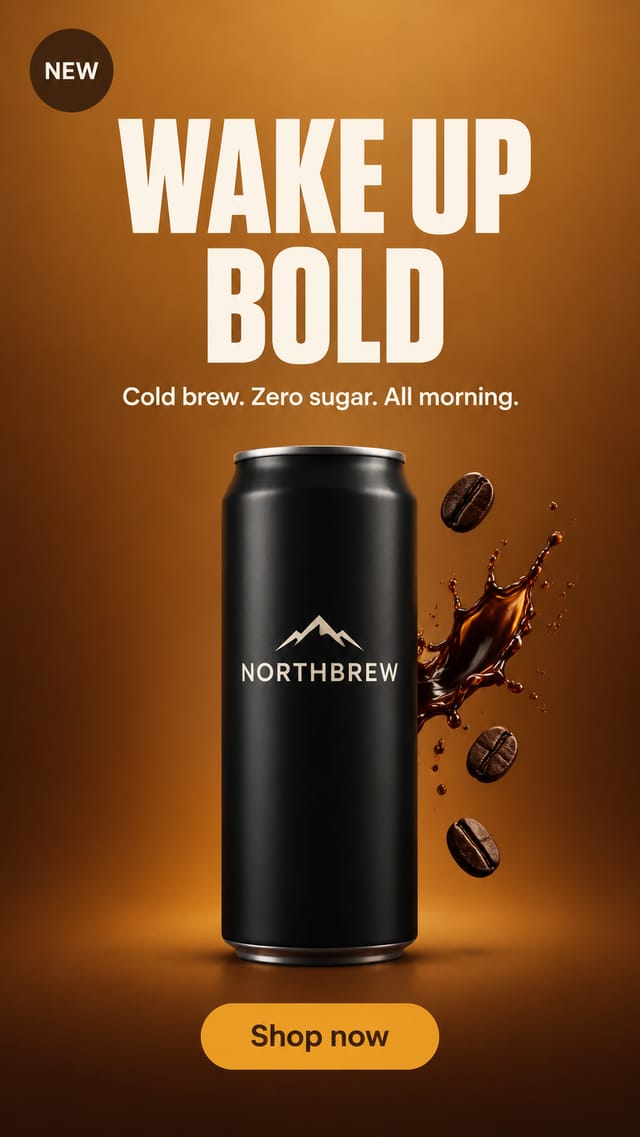
The finished static ad, 9:16, exactly as it will be posted: headline, product, badge, button. It is the last frame of the entrance clip and the first frame of the exit clip, so nothing on it is ever redrawn. For another size, set the same ratio on the Clean background and on the Entrance.
Step 2
A few words on the feel of the motion: clean and premium, playful, punchy, slow and cinematic. The entrance director takes the mood from here. Leave it as it is for a polished default.
Step 3
An AI reads the ad once and writes down the background and every element on it, back to front, with the exact words. The clean background uses this list to know what to remove; the director uses it to know what to animate.
Step 4
With the empty background and the finished ad in front of it, an AI motion designer writes one paragraph: which element arrives when, from where, how it moves and eases, what the camera does — ending exactly on your ad. Edit the paragraph by hand, then rerun the Entrance; Exit and Loop follow.
Step 5
Entrance: Seedance, 8 seconds, 1080p, no audio, pinned to the two frames — it starts on the clean background and ends on your ad, so the ad in it is your ad, not a redraw. Exit: the entrance played backwards, frame for frame, so every element leaves exactly the way it arrived and nothing can smear or linger. Loop: Entrance and Exit cut together — the ad builds, comes apart, and the last frame meets the first. One 16-second clip that loops without a seam. Change the Entrance and rerun it; Exit and Loop follow.
Step 4
Why a background before the video? A video clip needs a first frame and a last frame. The last frame is your ad. The first frame is your ad with everything removed — this empty background. The Entrance starts here and builds up to your ad; the Exit plays that back to here. Nothing is redrawn: both frames come from your ad. If any element is left over, rerun this node alone before the clips.
What it made
Results that the template made in Nodaro. Your results follow your own inputs.
Nodes in this template
The template is a workflow of 8 nodes. Each node below links to its page:
- Prompt: 2
- Adjust Speed: 1
- Combine Videos: 1
- Generate Image: 1
- Generate Video: 1
- Text: 1
- Upload Image: 1
Use this template
- Open the template in Nodaro and click Clone & customize. Nodaro copies it into My Workflows.
- Replace the inputs with your own: Your ad.
- Click Run. The editor shows the price before anything runs.
Templates lists every template, and Choosing a model helps when you swap a model.
Frequently asked questions
What does the Ad Motion Studio template make?
One finished static ad in, three ready-to-post clips out: an entrance video where the ad builds itself piece by piece, the same build played backwards as an exit, and the two cut together as a seamless loop — text, product and logo unchanged.
How much does one run of Ad Motion Studio cost?
About 139 credits, the price of its models when the template was saved. The editor shows the current price before you run it, and you pay only for the nodes that run.
Which models does Ad Motion Studio use?
GPT Image 2 and seedance. You can switch any of them on the canvas after you clone the template.
Do I need to build a workflow to use Ad Motion Studio?
No. Clone the template, replace its inputs with your own and click Run. The workflow is already built and connected.
Related
Static ad templates
Ad A/B Studio
Ad Funnel Studio
Ad Localizer Studio
Ad Remix Studio
Last updated on
Ad Localizer Studio
One finished ad in, the same ad out in two more languages and two more shapes: every word translated in place with the layout, typography and brand names…
Ad Remix Studio
A photo of an ad you liked in the street in, three finished ads for your brand out — square, story and banner — in that ad's look with your product as the…