
 Nodaro Docs
Color / Look
Pick one of 41 color grades, such as Teal & Orange, Kodak Portra or Bleach Bypass, and Nodaro adds that grade to the prompt of your image and video nodes.
The Color / Look picker sets the color grade of an image or a video: its palette and the way its colors are treated. You choose a look from its catalog, such as Teal & Orange, Kodak Portra, Bleach Bypass or iPhone HDR. Nodaro adds tested wording for that grade to the prompt of every node you connect it to. The picker never calls a model, so it costs no credits.
When to use it
- Give an image the look of a film stock, such as Kodak Portra, Kodachrome 64 or Cinestill 800T.
- Match the colors of a social platform: Instagram Warm, TikTok Saturated, iPhone HDR or Polaroid Faded.
- Keep the same grade on every shot of a sequence: connect one picker to all its image and video nodes.
- Support an emotion with color, for example a Cool grade for a lonely scene or a Warm grade for a cozy one.
How to use it
Add the picker
Open the node picker and choose Creative Controls › Light & Look › Color / Look.
Choose a look
Click the node and choose a look from the grid. The looks are grouped into Palette, Film Emulation and Social Preset.
Connect it
Drag from the picker's output to the Look input of a Generate Image or Generate Video node. You can also connect it to a Text or Prompt node to use the wording in a longer text.
Run the image or video node
The grade's wording is added to the end of the prompt when the connected node runs.
Settings
| Setting | What it does |
|---|---|
| Color / Look | The grade to add. The default is Warm. |
| Custom text (before) | Your own words, added before the grade's wording, for example heavy grain. |
| Custom text (after) | Your own words, added after the grade's wording, for example with film burn at the edges. |
| Prompt hint | Full (default) adds a longer description of the grade. Compact adds only the short term. See Full or Compact. |
To see the exact words the picker will add, switch the node to the Prompt or Both display mode. The settings panel shows the same text under Will inject into prompt.
Every color look
Filter by group or search by name. The words under each name are the term the picker adds in Compact mode.
Palette · 13 options
 Warmwarm color grade
 Coolcool color grade
 Teal & Orangeteal and orange grade
 Split Toning
 Selective Color
 Faded Mattefaded matte grade
 Log Flatflat ungraded log footage
 Desaturateddesaturated color grade
 Monochrome B&Wblack and white
 Sepiasepia tone
 Pastelpastel color palette
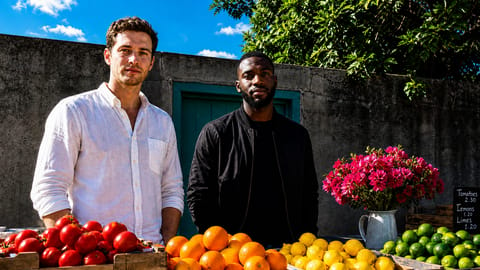 High Contrasthigh contrast color grade
 Vibrantvibrant saturated color palette
Film Emulation · 20 options
 Kodak Portra
 Kodak Ektar
 Kodak Vision3
 Fuji Pro 400H
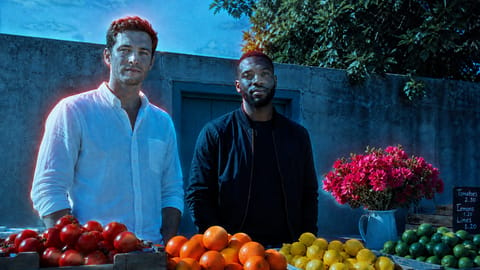 Cinestill 800T
 Bleach Bypass
 Technicolor 3-stripthree-strip technicolor
 Two-Strip Technicolor
 Eastman Color
 Hand-Tintedhand-tinted black-and-white photograph
 Agfa / ORWOorwo film stock
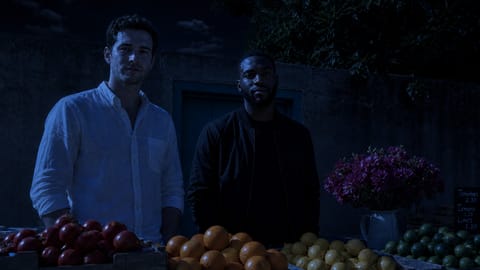 Day-for-Nightday-for-night grade
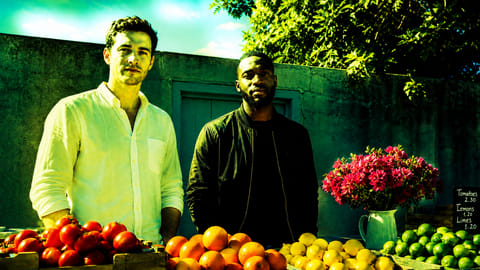 Cross-Processedcross-processed film look
 Kodachrome 64
 Ektachrome 100
 Kodak Tri-X 400 (B&W)kodak tri-x 400 black-and-white film
 Aerochrome / Color Infraredaerochrome color infrared film
 Fuji Instax / Instant Filmfuji instax instant film
 Cinestill 50D
 Expired Film / Light-struckexpired light-struck film
Social Preset · 8 options
 Instagram Warmwarm instagram filter
 TikTok Saturatedsaturated tiktok look
 YouTube Vlog Flatflat youtube vlog grade
 iPhone HDR
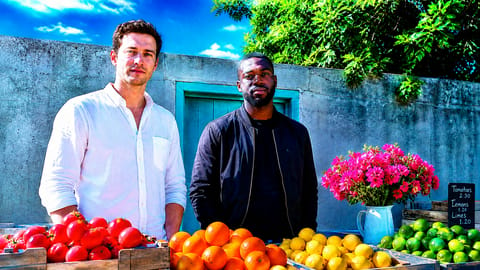 Y2K Saturatedsaturated y2k digital color
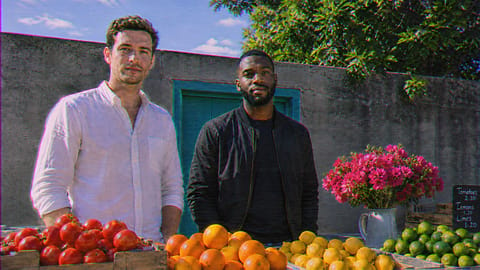 MTV 90s VHS90s mtv vhs look
 Polaroid Fadedfaded polaroid look
 Lifestyle Warm Magazinewarm lifestyle magazine grade
On Nodaro Cloud, each tile shows the same base image with that grade. A switch beside the picker's heading changes the tiles to drawn illustrations. Self-hosted installs show the illustrations only.
Tips
- Grade and light together. Color / Look works best with Lighting: Golden Hour light with a Warm grade, or Blue Hour light with a Cool grade.
- Use a film stock for a period feel. Kodachrome 64, Technicolor 3-strip or Expired Film / Light-struck give an image an older look.
- Pair color with the air. A warm or cool grade with Atmosphere reinforces the mood, for example a Cool grade with Fog.
- Grade a whole story. In a story workflow, connect one Color / Look picker to every scene so the film has one grade.
Frequently asked questions
Related
Creative Controls
Lighting
Style
Atmosphere
Generate Image
Last updated on
Lighting
Set how an AI image or video is lit. Combine the time of day, lighting style, direction, lighting ratio and color temperature from 72 tested options.
Mood
Pick up to two of 51 moods, such as calm, tense or joyful, and Nodaro adds tested wording for the emotion to the prompt of the image or video nodes you connect.