
 Nodaro Docs
Music Genre
Set the genre of AI music: up to 3 of 29 genres for a fusion, or one genre with a subgenre, plus an era. Works with Suno, Generate Music and Text to Audio.
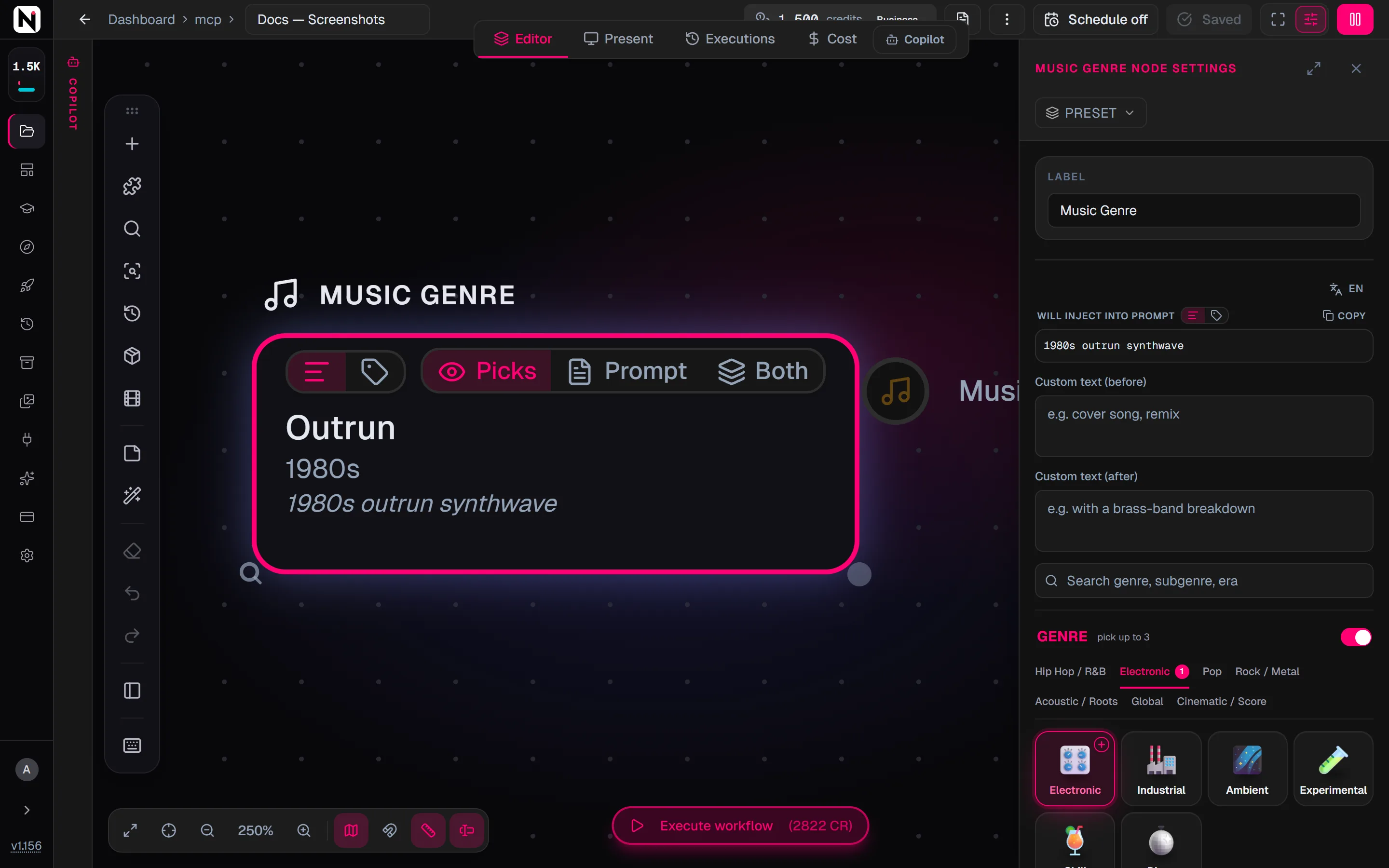
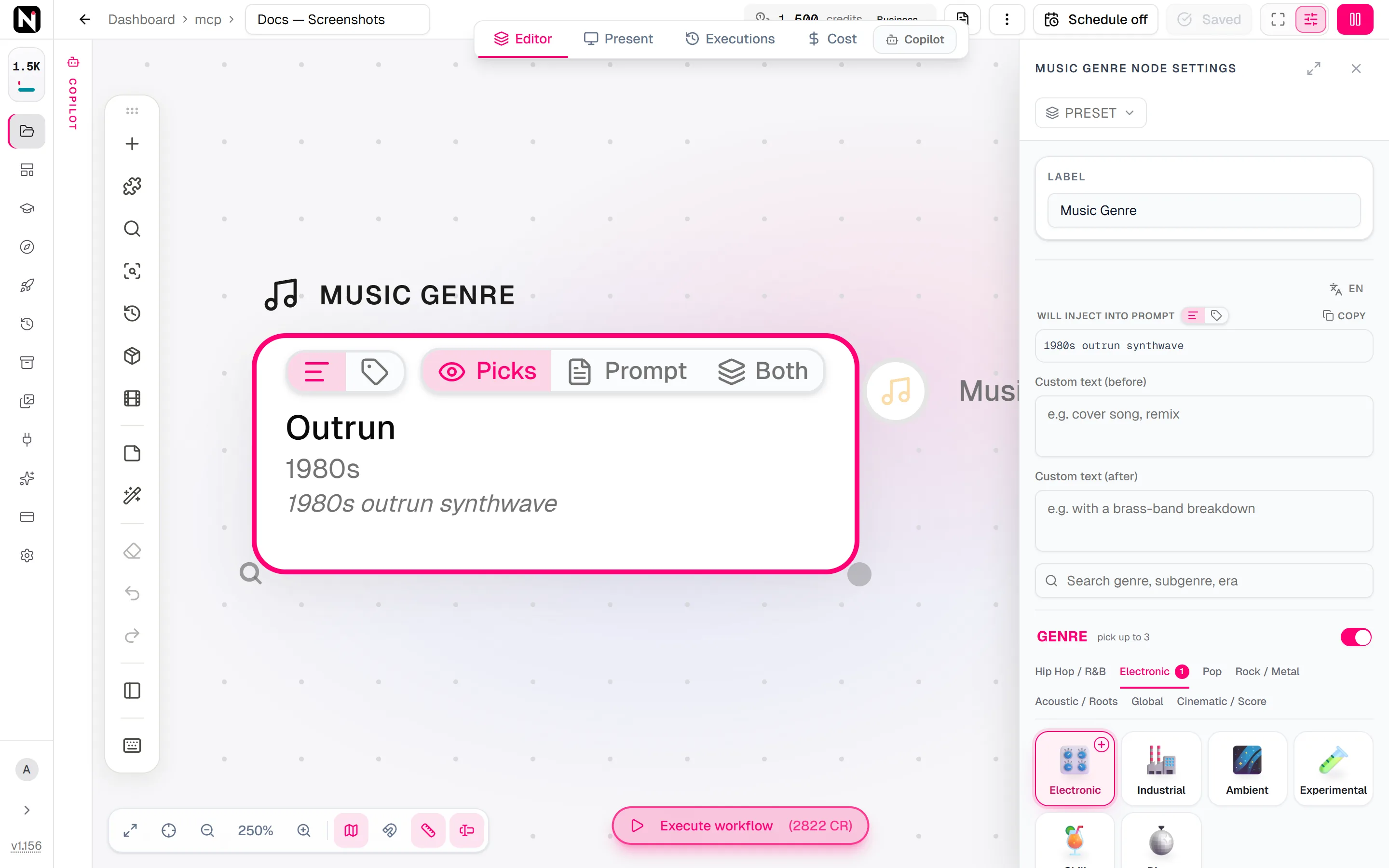
The Music Genre picker sets the genre of a piece of music. You choose a genre, or up to three for a fusion, with an optional subgenre and era, such as Electronic with the Outrun subgenre from the 1980s. Nodaro adds the matching words to the style or prompt of the music node you connect it to. The picker never calls a model, so it costs no credits.
When to use it
- Give Suno a clear genre without typing style tags by hand.
- Blend genres into a fusion, such as Rock with Jazz, or Lo-Fi with Jazz and Ambient.
- Place a song in time with an era, from the 1920s to Modern and Futurist.
- Keep the same genre across several music nodes in one workflow.
How to use it
Add the picker
Open the node picker on the Audio tab and choose Creative Controls › Music & Voice › Music Genre.
Choose a genre
Click the node. In the Genre section, a row of tabs groups the genres: Hip Hop / R&B, Electronic, Pop, Rock / Metal, Acoustic / Roots, Global and Cinematic / Score. Pick up to 3.
Add a subgenre and an era
With one genre picked, the Subgenre section lists that genre's subgenres. The Era section sets the period of the sound.
Connect it
Drag from the picker's output to the Audio style input of Suno Create Music, Generate Music or Text to Audio.
Run the music node
The genre is added to the music node's request when it runs.
Settings
| Setting | What it does |
|---|---|
| Genre | Up to 3 genres. With two or three, the genres are joined as a fusion, and no subgenre is used. |
| Subgenre | One subgenre of the chosen genre. It works only when exactly one genre is picked. |
| Era | The period of the sound: a decade from the 1920s to the 2010s, Modern or Futurist. |
| Custom text (before) | Your own words, added before the genre, for example cover song remix. |
| Custom text (after) | Your own words, added after the genre, for example with a brass band. |
| Prompt hint | Full (default) adds the longer description. Compact adds only the short terms. See Full or Compact. |
A new node starts empty and adds nothing until you pick. The words are built in a fixed order: the era first, then the subgenre, or the genre when there is no subgenre.
To see the exact words the picker will add, switch the node to the Prompt or Both display mode. The settings panel shows the same text under Will inject into prompt.
Where the genre goes
| Connected node | What happens to the genre |
|---|---|
| Suno Create Music | Added to the Style field when the node is in custom mode, for example when Style, Lyrics or Title is filled, and to the Prompt otherwise |
| Generate Music | Added to the prompt, and used as the node's Genre when its own Genre setting is empty |
| Text to Audio | Added to the prompt |
| Voice Design | Ignored. The node shows a warning. |
You can also connect the picker to a Text or Combine Text node to use the words in a longer text.
Every genre, subgenre and era
Filter by Genre, Subgenre or Era, or search by name. The words under each name are the term the picker adds in Compact mode.
Genre · 29 options
 Hip Hop
 R&Brhythm and blues
 Soul
Soul Funk
Funk Lo-Fi
Lo-Fi Electronic
 Industrial
 Ambient
 Experimental
 Chill
Chill Disco
Disco Pop
Pop Anime / J-Rockanime music
 Rock
Rock Punk
Punk Metal
Metal Jazz
Jazz Blues
Blues Country
 Folk
Folk Gospel
 Reggae
 Latin
Latin Worldworld music




Subgenre · 218 options
 Trap
Trap Boom Bap
- Lo-fi Hip Hop
 Drill
Drill UK Drill
 Cloud Rap
 Consciousconscious hip hop
 Gangstagangsta rap
 Jazz Rap
 Alt Hip Hop
 Phonk
Phonk Drift Phonk
 UK Hip Hop
 Grime
Grime PluggnB
 Ragerage hip hop
 Jersey Club
 Brazilian Funk
 Moombahton
 Glitch Hop
 Neo-Soul
- Contemporary R&Bcontemporary rhythm and blues
 Alt R&Balternative rhythm and blues
 Neo R&Bmodern rhythm and blues


























































































Era · 12 options
 1920s
1920s- 1930s
- 1940s
 1950s
1950s 1960s
1960s- 1970s
 1980s
1980s 1990s
1990s 2000s
2000s- 2010s
- Modern
 Futuristfuturistic
Tips
- Write a full brief with three pickers. Add Music Mood for the feel and Instrumentation for the instruments and vocals.
- Check the result. The Final view of Suno Create Music shows the assembled prompt, style and lyrics, including the words from connected pickers.
- Fusion or subgenre. Several genres give a fusion. A subgenre is more precise, but it needs a single genre.
Frequently asked questions
Related
Music Mood
Instrumentation
Suno Create Music
Generate Music
Creative Controls
Last updated on
Transition
Make an AI video model perform a transition inside one clip, such as a Whip Pan, a Match Cut or a Liquid Morph. Choose from more than 80 transitions.
Music Mood
Describe how AI music should feel: one energy level, up to 3 emotions and up to 3 vibes, such as Driving, Triumphant and Cinematic. Works with Suno and more.