
 Nodaro Docs
Dubbing
Translate spoken audio or a whole video into another language and keep each speaker's own voice. Dub a file or a YouTube link, from 40 credits per minute.
The Dubbing node translates spoken audio, or a whole video, into another language and keeps each speaker's voice. Wire in a recording or a video, or paste a public link, and choose the target language. You get the dubbed audio, and for a video, the same pictures with the translated dialogue.
When to use it
- Localize podcast episodes or full videos for audiences in other languages.
- Dub a YouTube or TikTok video from its link, without downloading it first.
- Make versions of training or educational content in several languages.
- Reuse interview audio in another language.
- Translate the voiceover of a marketing video.
Quick start
Add the node
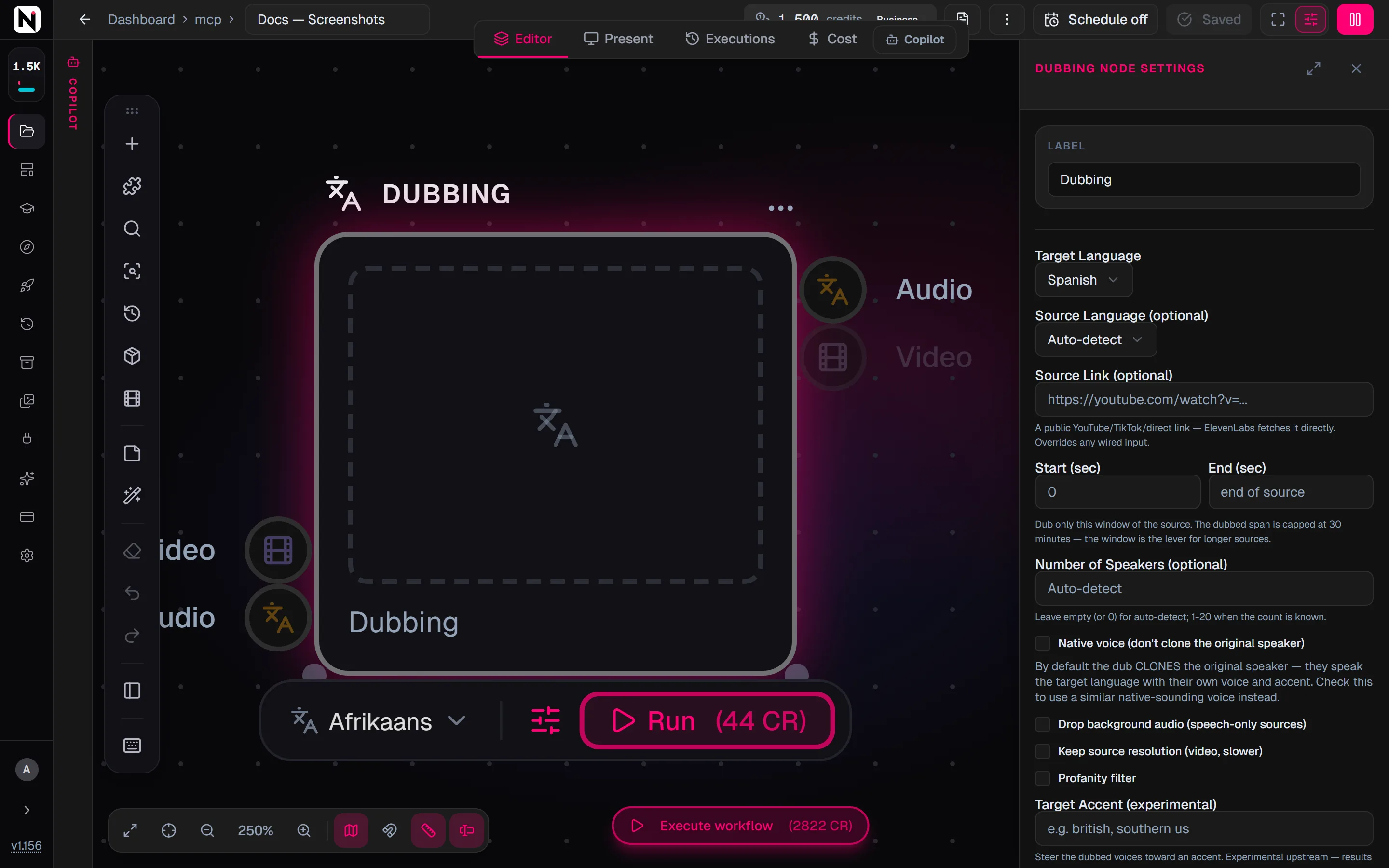
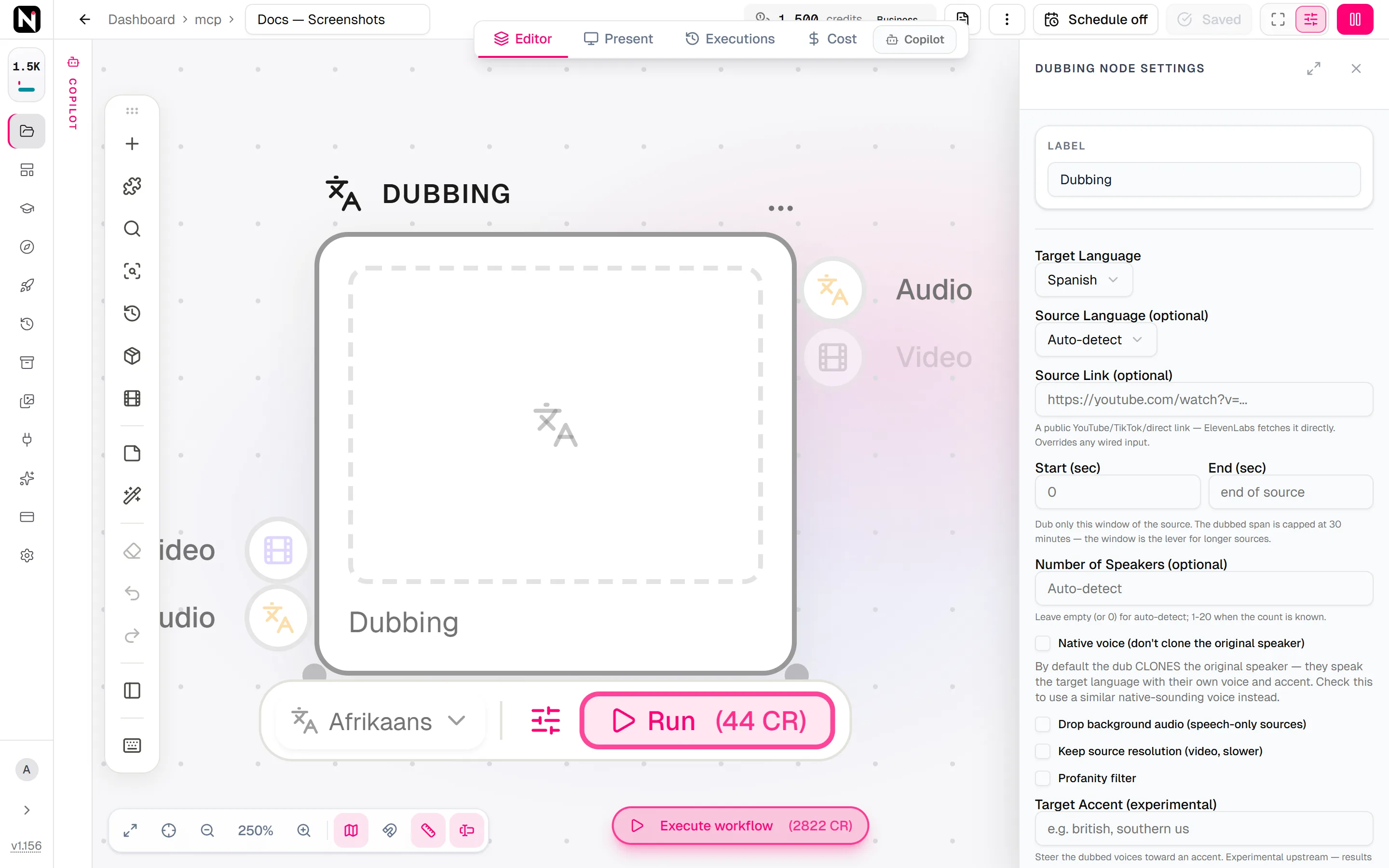
Press Tab on the canvas and choose Audio › Voices › Dubbing.
Give it the source
Wire an audio node into Audio, or a video node into Video. To dub a public YouTube, TikTok or direct media link instead, paste it into Source Link (optional).
Choose the languages
Set Target Language. Set Source Language (optional) when you know it, or leave it on Auto-detect.
Run it
Click Run on the node. Dubbing takes some time. For a video source, the dubbed video appears on the Video output and the dubbed track on the Audio output.
Inputs and outputs
| Input | Accepts | What it does |
|---|---|---|
| Audio | Audio nodes, such as Upload Audio and Reference Audio | The recording to dub. The node returns dubbed audio. |
| Video | Video nodes, such as Upload Video and Generate Video | The video to dub. The node returns the dubbed video and its audio track. |
When both inputs are wired, the video wins. A Source Link overrides both inputs.
| Output | What it carries |
|---|---|
| Audio | The dubbed audio track. Always produced. |
| Video | The dubbed video, with the original pictures. Only for a video source. |
The file decides the mode, not the input. An audio-only file on the Video input is dubbed as audio. A video on the Audio input is treated as a request for audio. With a Source Link, the mode follows what the link points at.
Settings
| Setting | What it does |
|---|---|
| Target Language | The language of the dub. Required. The default is Spanish. |
| Source Language (optional) | The language spoken in the source. Auto-detect (the default) finds it for you. |
| Source Link (optional) | A public YouTube, TikTok or direct media link. The link is fetched directly for the dub. Overrides any wired input. |
| Start (sec) and End (sec) | Dub only this window of the source. Empty means the whole source. |
| Number of Speakers (optional) | From 1 to 20 when you know the count. Empty or 0 detects the speakers automatically. |
| Native voice (don't clone the original speaker) | Off by default, so each speaker is cloned and speaks the new language with their own voice and accent. On uses a similar native-sounding voice from the Voice Library, with a clean accent in the target language. |
| Drop background audio (speech-only sources) | Removes the background sound from the dub. Improves the result for speeches, monologues and voiceovers. |
| Keep source resolution (video, slower) | Renders a dubbed video at the source's own resolution. Slower. |
| Profanity filter | Filters profanity in the dubbed speech. |
| Target Accent (experimental) | Steers the dubbed voices toward an accent, such as "british" or "southern us". Results vary. |
Limits
| Limit | Value |
|---|---|
| Longest dubbed span | 30 minutes. For a longer source, set a Start and End window. |
| Largest uploaded file | 500 MB. The limit does not apply to a Source Link, because the link is fetched directly. |
Credits
Dubbing costs 40 credits per minute of the dubbed span, with a minimum of 1 minute. The dubbed span is the Start and End window when you set one, and the whole source otherwise.
| Source | Credits |
|---|---|
| A 60-second clip | 40 |
| A 2-minute clip | 80 |
| A 10-minute video | 400 |
| A 45-minute video with a window from 0:00 to 10:00 | 400 |
A 45-minute video without a window is refused, because it is longer than 30 minutes. Sometimes the length cannot be measured before the run, for example for a Source Link. The node then holds 80 credits, the price of 2 minutes, and checks the 30-minute limit once the media is read.
| Model | Maker | Modes | Credits | Details |
|---|---|---|---|---|
| ElevenLabs Dubbing | ElevenLabs | Dubbing | 40 | Translate + dub audio or a whole video into a new language — video in, dubbed video out. Async. |
| ElevenLabs Dubbing v2 | ElevenLabs | Dubbing | 1100 | Translate + dub audio or a whole video into a new language — video in, dubbed video out. Async. |
Dub into Hebrew
Dubbing into Hebrew uses ElevenLabs Dubbing v2 and costs 1,100 credits per started minute. It works differently from the other target languages:
- Upload the source first. Wire an uploaded audio or video. A Source Link is not supported for Hebrew.
- Trim before you dub. The Start and End window is not supported. Cut the part you need with Trim Video or Trim Audio first.
- Voices and background stay. The dub keeps the speakers' voices and the background sound, and detects the speakers automatically.
- Fewer options. Native voice, Number of Speakers, Drop background audio, Profanity filter and Target Accent are refused for Hebrew before the run starts.
A Hebrew video dub keeps the source resolution.
Clone the speaker or use a native voice
By default, the dub keeps each speaker's identity. A Hebrew speaker dubbed into English sounds like the same person speaking English, with their own accent.
Turn on Native voice when the dub should sound like a native speaker of the target language. A similar voice from the Voice Library then speaks for each speaker.
Tips
- Set the source language when you know it. Auto-detect is reliable, but an explicit language avoids mistakes with accented or mixed-language speech.
- Set the number of speakers. Automatic detection can merge two speakers or split one speaker in two.
- Use clean sources. Moderate background noise is fine, but music under the speech lowers the quality.
- Test on a short window first. Dub one minute with Start and End, check the language quality, then dub the rest.
- Dub long sources in parts. Each window is its own run and its own per-minute charge.
- Match the lips. A dubbed video keeps the original mouth movements. To match the lips to the new language, wire the dubbed audio and the video into Lip Sync.
Troubleshooting
The run is refused because the source is too long. The dubbed span is over 30 minutes. Set Start (sec) and End (sec) to dub one part at a time.
A dub with Native voice fails. Native voice needs a free voice slot, and the run fails when none is free. Turn Native voice off to dub with each speaker's own cloned voice.
A Hebrew dub is refused. One of the options that Hebrew does not support is set, or a Source Link is used. Clear the option, or upload the source and wire it in.
From the API
POST /v1/dubbing takes exactly one of audioUrl, videoUrl or sourceUrl, plus targetLanguage and the optional sourceLanguage, numSpeakers, disableVoiceCloning, dropBackgroundAudio, startTime, endTime, highestResolution, useProfanityFilter and targetAccent. A video dub returns videoUrl and the dubbed audioUrl. A span over 30 minutes is refused with status 413. The MCP tool is dubbing. See Voice and media.
Frequently asked questions
Related
Voice Changer
Transcribe
Lip Sync
Trim Video
ElevenLabs Dubbing
Last updated on
Voice Remix
Describe a voice in plain words and hear it speak your preview text. The quick way to explore voice ideas, with no reference recording and no settings to tune.
Suno Create Music
Make full songs with Suno V6 and earlier Suno versions. Write lyrics with metatags, set the style and the vocals, or create an instrumental track.