
 Nodaro Docs
Transition Lab: what 250 videos taught us about AI video transitions
We tested 82 transitions in more than 250 AI video clips. Models blend by default, ignore the length you ask for, and follow the start and end frames.
Tal Asa ·
We tested 82 transitions and found that the hard part of a transition is not the effect. It is the swap: the moment one picture becomes the next.
- Study length
- 13 days
- Test clips
- 250+
- Transitions
- 82
- Previews approved
- 81 of 81
- Credits
- 48,000+
- Main model
- Seedance 2.5
Our Transition picker adds a transition to a video prompt: a Whip Pan, a Match Cut, a Liquid Morph, a Fast-Forward from day to night. The video node gets a start frame and an end frame, and the model draws everything in between.
The study began as a simple check: does the transition we pick actually reach the model the way we meant it? It did not always. A first reel of about twenty transitions showed that cuts were getting a duration phrase, so we removed it. In the next check on production, a Match Cut still blended. The prompt that reached the model said:
A pacing phrase had ridden along onto the cut. The model dissolved the two pictures into each other. A cut that blends is not a cut.
Fixing that one bug turned into a study of all 82 transitions. By the end, every one of them had been rendered, rated and, where needed, rewritten.
The three discoveries that shaped the study
The model blends by default.
Unless the prompt gives it a reason not to, the model falls back to a crossfade of about one to one and a half seconds between the start and end frames. Cuts turn into dissolves, and the length you ask for barely changes it.
A transition works when the swap has somewhere to hide.
One opaque event that covers the whole frame, such as static, a black field, a photographic negative or a liquid ripple, carries the change of shot. Wording that only describes an effect often lets the model crossfade underneath it.
The start and end frames decide as much as the words.
The same wording made a clean cut on one pair of stills and a morph on another. A double exposure appeared only when we changed the stills, not the words.
What we actually tested
The study ran for 13 days, from September 23 to October 5, 2026. We generated more than 250 test clips and used more than 48,000 credits. Both figures are lower bounds: they count only the rounds we logged with a number.
Every clip used the same setup:
- Seedance 2.5, image-to-video, at 480p, 4 seconds, 16:9.
- A start frame and an end frame, and the same film look on every take.
- Two beats: the first shot from 0 to 2 seconds, then the transition opening the second shot.
We sorted the 82 transitions into nine families by how they work, because the families fail in different ways:
| Family | What happens | Examples | Transitions |
|---|---|---|---|
| Subject becomes material | The subject turns into mist, sand, water or shards and reforms | Dissolve to Mist, Shatter & Reform, Vortex Swirl | 15 |
| An element covers the frame | Ink, sand, petals or smoke fill the frame | Ink Splash, Sand Storm, Smoke Puff | 8 |
| Light or lens event | A flash, a flare or a crack on the lens | White Flash, Lightning Strike, Lens Crack | 8 |
| Force and impact | Something hits the camera or the scene | Shockwave, Punch Into Camera, Explosion Blast | 7 |
| Portal zoom-throughs | The camera travels into an eye, a mirror or a screen | Zoom Into Eye, Zoom Into Mirror, Walk Through Doorway | 11 |
| Classic fades and wipes | The editing room's basics | Cross-Dissolve, Fade to Black, Wipe, Whip Pan | 9 |
| Analog and screen glitch | Static, a negative, a broken signal | Channel Flip, Color Invert Flash, Datamosh | 7 |
| Cuts | The change happens between two frames | Hard Cut, Match Cut, Jump Cut, Snap to Black | 8 |
| Time | Time passes inside one shot | Fast-Forward (Day → Night), Aging, Rewind | 8 |
The 82nd option, Auto, adds nothing to the prompt, so it has no clip.
We changed one thing at a time. In an A/B test, the two prompts differed only in the transition's own text, and we checked every prompt sent, character by character, against the text we expected. A person on the team rated every take from 1 to 5. Automated measurements checked what the eye can miss: the frame where a cut lands, how long a blend runs, which way a wipe travels. An automated second reviewer scored the clips as a cross-check. When they disagreed, the person's rating decided.
Scope: a product engineering study, not a statistical benchmark
We did not run every prompt many times to estimate a success rate. Most A/B tests had one take per side, so a one-point gap between two takes is noise. The goal was wording that works reliably enough to ship, for every transition in the picker. The tests used Seedance 2.5, image-to-video, 480p, 4-second clips and English prompts. When this article says something "worked" or "failed", it refers to this series of experiments. Other models may behave differently.
Name it, then explain it
The picker used to send a transition's name, such as match cut, and trust the model to know what it means. We tested that against sending the name followed by a one-line description of how it plays out.
On the four transitions we tested this way (Roll, Shatter & Reform, Freeze-Frame Jump and Match Cut), the name with a description won 4 of 4. With the name alone, the shards of Shatter & Reform never reassembled.
So today every transition reads as its name followed by its description, in parentheses. Whip Pan, for example:
The name tells the model which transition is meant. The description tells it what the frames should do.
Cuts that kept dissolving
Back to the Match Cut that dissolved. We fixed it in three steps.
First, a cut no longer carries any timing or pacing phrase. A duration or a "natural timing" describes a change over time, and on a cut it invites a blend.
Second, every cut now ends with one explicit sentence:
Third, we learned that one word in that sentence matters. On Seamless Match, a cut meant to feel invisible, we tested the sentence without "abrupt". Without it, the cut dissolved. The take with "abrupt" scored 5; the take without it scored 2.
Across the cut tests, the sentence held:
The cut rows also improved when the wording described the cut frame itself. For Snap to Black, that is a single beat of pure black. For Jump Match, the swap at the top of a leap. For Match Cut, one shape held in place. Rewritten this way, the cut rows scored 73 of 80 against 62 of 80 for the old wording. On Snap to Black, the old wording held the black for 1.46 to 1.75 seconds. The new wording held it for 0.67 to 1.12 seconds, closer to a beat.
A cut is a single frame. Say so, say that the two images never blend, and give the cut no duration or pacing.
The length you ask for is not the length you get
We wanted a gentler option for two of the cuts: a short blend instead of a hard cut. So we asked the model for blends of about 1, 2 and 3 seconds, and measured each take from 10% to 90% of the mix.
Asking for twice the length did not double it: the 2-second blends ran 1.04 to 1.34 seconds, inside the range of the 1-second ones. On a 4-second clip with two shots, the model made one crossfade of about 1 to 1.5 seconds whatever number the sentence named.
The blend also changed the character of some cuts. On Jump Cut, the man was meant to be in one place on one frame and in the next place on the next frame. With the blend sentence, he leapt across the rooftop instead. On Match Cut, the shared shape was lost in the crossfade. Only Seamless Match and Jump Match kept what made them themselves.
FailedJump Cut with a short blend. He leaps across the roof, the move the cut exists to avoid.
ApprovedSeamless Match with a short blend, at the end of the clip. A clean blend of about 1.15 seconds.
So the product offers one blend length, Short, and only on those two cuts. Every other duration, and every duration on the other six cuts, keeps the hard cut.
Timing showed the same stubbornness elsewhere. On Zoom Into Mirror, every take of the final round swapped scenes inside the mirror at about 2.3 seconds, whatever the wording said. That is when the second shot's window opens. The wording changed only how well the swap was hidden.
Time-lapse transitions had the opposite problem. Squeezed into a short window in the middle of the clip, Fast-Forward (Day → Night) opened with a single-frame jump. Given the whole clip, the light flowed.
Do not count on a number in the prompt to time a transition. Place it with the start and end frames and the clip length, and give time-lapses the whole clip.
Give the swap somewhere to hide
The glitch family taught us the most about hiding. Their old wording described an effect: interference bands, chromatic aberration, pixel bleed. The model often drew a little of the effect and then crossfaded underneath it.
The rewrites did something different. Each one put a single opaque event over the whole frame and placed the change of shot inside it. Channel Flip got a burst of black-and-white static, Color Invert Flash a photographic negative, and Display Wipe a picture that collapses to a line and a dot on black. Across the seven glitch rows, the rewrites scored 25 of 35 against 21 of 35 for the old wording.
The winning texts share a shape: the event, then "The camera stays where it is and the framing does not change.", then the handoff, then how the shot ends, then one sentence about the whole frame. Color Invert Flash reads:
A flicker needs an off state
Hologram Flicker was the case that proved the rule. Neither of its first two versions flickered: both crossfaded. Texture words such as "interference bands" gave texture, not a flicker.
Both new versions gave the picture an off state: black. The first cut out to solid black between hard flashes, and produced a real strobe, with 14 fully black frames. The second let the first shot flicker out to black, then drew the new shot with a bright scan line. The scan line became a top-down wipe of its own, and that read best as a hologram materialising. We shipped the second.
The picture cuts out to black between hard flashes: the only take that truly flickered.
ApprovedA scan line draws the new shot on black. Shipped.
A carrier can also take over. We once wrote a double exposure carried by a light leak. The model rendered a light-leak wipe, not a double exposure: the carrier became the transition.
Hide the change of shot inside one opaque event that covers the whole frame, and say in the last sentence that the change happens inside it.
Double exposure: the pictures decided
Double Exposure was the hardest transition in the study. It took four rounds.
On our first pair of stills, a small dark figure in a wheat field and a harbour at night, we tried four different see-through wordings. Measured frame by frame, they rendered effectively the same video, and the same as our plain Cross-Dissolve. A light leak changed the result, but into a light-leak wipe.
The breakthrough came when we stopped rewriting and looked at the stills. A classic double exposure needs a large silhouette against a bright background. Our figure filled only about 29% of the frame height, and the night harbour was very dark. So we made a new pair: a solid black profile filling 93% of the frame height on a near-white ground, ending on a bright mountain lake.
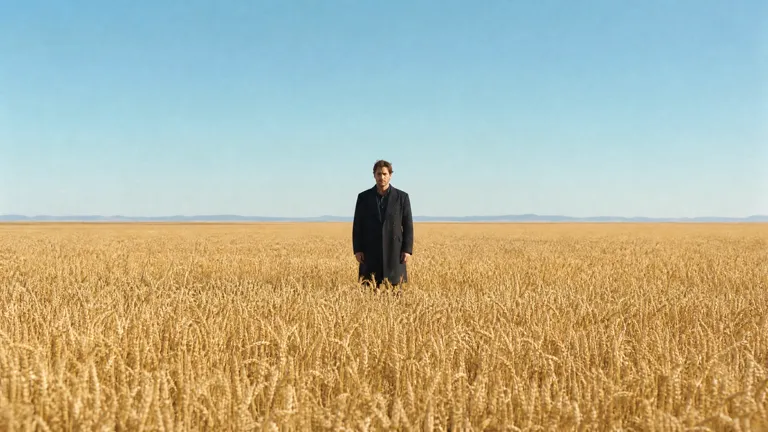
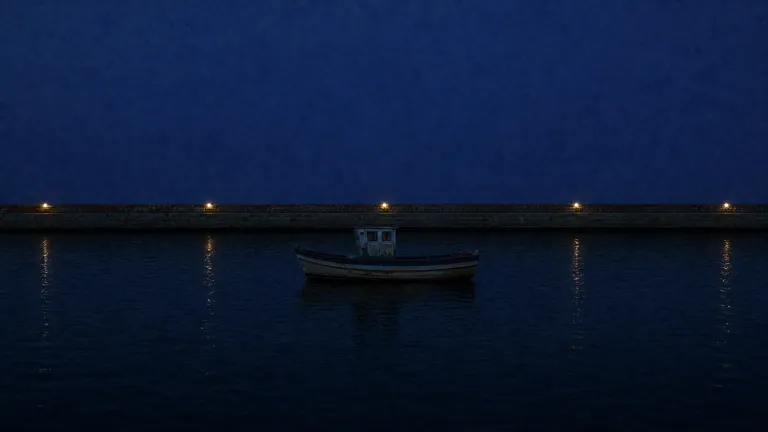
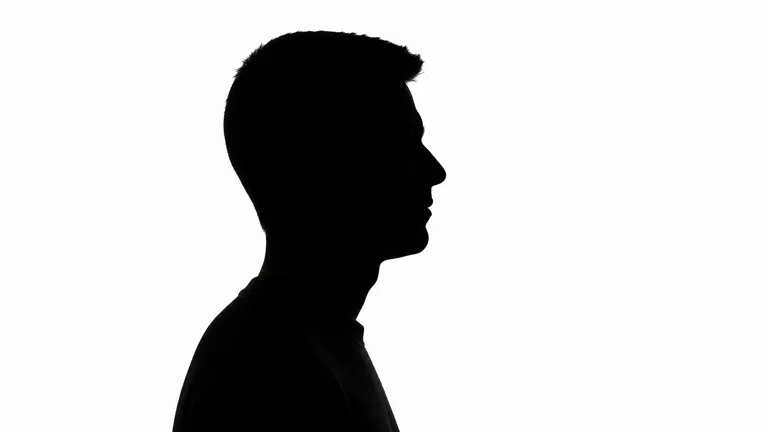

On the new pair, even a plain crossfade reads a little like a double exposure: the lake shows inside the dark figure while the white ground washes out. The new wording added a real but partial step on top. It asks for the figure to fill first:
We measured how far the figure ran ahead of the ground. With the new wording, the figure led by up to 0.31 of the mix. With the old "translucent double exposure" wording on the same pair, the two moved in lockstep: a lead of 0.01. That is one take each, so we call it a lead, not a law.
FailedOld wording on the new pair. Figure and ground fade together, like a crossfade.
ApprovedSilhouette wording on the same pair. At 2 seconds, a textbook double exposure.
LessonWhen different wordings produce the same video, the words are not the variable. Look at the pictures.
The same words, two different results
Match Cut took the most takes of any cut. A match cut rhymes two shots: one shape in the first picture lands in the same place and size in the second.
Over four rounds and more than a dozen takes, nothing beat the old wording. Asking the camera to push in on the shape made it push in every time, and the cut was no better. A wording borrowed from our camera catalog gave the cleanest cut, but it invented a gear, and only without an end frame.
The wording that finally won described the cut frame:
On a pair that cuts from a man crouched on a rooftop to the same man mid-stride on a dune, it made a clean single-frame cut, with the stride at the same place and size. It beat the old wording 5 to 3.
Then we ran it across a second pair of stills, a coin and a ferris wheel. There was no cut at all. The coin swelled into a glass disc with the wheel inside it, and both pictures shared the frame for about three quarters of a second. It broke our own no-blend rule, and it looked wonderful. We rated it 5 and made it the preview.
Old wording, coin to ferris wheel. A near-hard cut, but the coin misses the hub.
New wording, same pair. No cut: the coin becomes a glass disc holding the wheel.
Test transition wording on more than one pair of stills. A wording is only as good as the pictures it was tested on.
Wipes go where you point them, mostly
The Wipe now has a Direction setting: Auto, plus left to right, right to left, top to bottom, bottom to top and the two diagonals. Each direction changes only the words inside the wipe's description:
On the first take of each, five of the six directions went the named way. Left to right went right to left, which was the direction the model chose on that pair when no direction was named. We retook it with byte-identical input: 2 of 4 went the named way.
FailedAsked for left to right, it wiped right to left.
ApprovedThe same input, another take: left to right.
The automated checks caught what a quick look missed. The two diagonal wipes have mirror-image wording, but they did not render as mirror images: one ran at about 45 degrees, the other close to the frame's own diagonal of about 29 degrees. On both diagonals, the man's coat bled across the edge for a fraction of a second.
Before you rely on a named direction, check what the model does with no direction on the same stills. A direction against its own choice is the one most likely to fail.
Negative sentences are a guardrail, not a fix
Jump Cut had a specific failure. The man was meant to be crouched on one frame and already seated on the wall on the next. In 2 of 3 takes he sprang toward the new spot for a few frames first.
We added one sentence:
It gave 2 clean takes of 3, against 1 of 3 before. At the old rate, 2 or more clean takes in 3 happen about 26% of the time by luck. And the third take still smeared exactly like the old failures.
FailedWith the negative sentence. He still smears toward the wall.
ApprovedSame wording, another take. Crouched, then seated on the next frame.
This matches what we found in Camera Motion Lab: describe the frame you want first. Exclusions help at the margin.
Words the model ignores
Some sentences rendered as if they were not there at all:
- A double exposure that should stop at equal strength and hold unchanging, for a clear beat. There was no plateau.
- A fifth sentence asking everything outside a silhouette to stay the first shot. The whole frame ramped anyway.
- A weather shift whose text said it then clears, sun returns, on an end frame that was still raining. Both takes stayed rainy to the end.
- A datamosh whose blocks should slide sideways across the frame in long smeared streaks, on a still start frame. Blocks replaced blocks in place. Nothing slid.
A draft that broke the picture into confetti, not a datamosh.
ApprovedThe shipped wording. Blocks rendered as blocks; the smear words did not.
When the text and the frames disagree, the frames win. Describe what the model can make from the pictures it has.
Most of the old wording was already right
Rewriting everything would have been easy. It would also have been wrong.
Before rendering, we read all 81 descriptions on paper: 66 looked fine, 12 needed a rewrite and 3 needed a decision. On video, the first rewrite round won on 3 transitions, and the old text held on 6. For the classic fades and wipes, the old one-line descriptions scored 5 of 5 on six of nine rows. The Roll was one of the three that changed: the old wording swung part of the way and back, and the new one turns one way only, "with no swing back".
Single words carried weight. Seamless Match needed "abrupt". Melt Down got weaker when we dropped "standing". Zoom Into Mouth got better when we dropped "throat".
In the end, 41 of the 82 transitions shipped with new wording, and the rest kept theirs.
Test the existing wording as it is before rewriting it. Then change one thing at a time.
When two looks are both good, keep both
Smoke Puff tied: two versions scored the same, with two different looks. One engulfs the subject; the other covers the whole frame. Instead of picking one, we kept both as a Style choice.
Engulf, the default look.
Full cover, the second look.
Seven transitions have a Style now: Smoke Puff, Sand Storm, Sakura Storm, Aurora Sweep, Garden Bloom, Debris Shower and White Flash.
What still does not work
Some transitions shipped with wording that is the best we found, not a solved problem:
- Double Exposure depends on the stills. No take in four rounds held a true superimposition for half a second. A large, dark silhouette on a light ground is what makes it work.
- Zoom Into Mirror never passes through the glass. The scene swaps inside the mirror, and a liquid ripple hides the swap best.
- Match Cut can turn into a morph on some pairs of stills, as the coin did.
- Sand Storm's Light sweep style swept in one direction in 1 of 2 takes. The other take was an even grey fog.
What this changed in the product
- All 82 transitions in the Transition picker use wording tested in the lab. 41 of them changed.
- Every transition reads as its name followed by its description.
- Cuts carry the no-blend sentence, and take no duration or pacing.
- Seamless Match and Jump Match can blend instead of cutting, with a Short blend of about one second.
- The Wipe has a Direction setting, and seven transitions have a Style.
- In Nodaro Studio, 81 transitions show a preview clip in the transition picker. Each one is a real take from the study.
The rules we kept
- Write the transition's name and then what its frames do.
- A cut is a single frame. Say so, and say that the two images never blend.
- Give a cut no duration or pacing phrase.
- Do not count on a number to time a transition. On a 4-second clip, expect one blend of about 1 to 1.5 seconds.
- Hide the change of shot inside one opaque event that covers the whole frame.
- A flicker needs an off state: say that the picture cuts to black.
- Design the stills with the transition. The pair can matter more than the words.
- Test the wording on more than one pair of stills.
- When the text and the end frame disagree, the end frame wins.
- Check a named direction against what the model does with no direction.
- Describe the frame you want first. Treat negative sentences as a guardrail.
- Give time-lapse transitions the whole clip.
- When two looks are both good, keep both.
- Test the existing wording before rewriting it, and change one thing at a time.
What we learned
We started out trying to name transitions more precisely. We ended up describing what happens to the frame.
Left to itself, a video model takes the easiest path from the first picture to the last: a crossfade. A transition is everything that stops it from doing that. The words can give the change somewhere to hide, a black frame, a burst of static, a ripple. But the pictures decide whether the hiding place is believable: a silhouette that can hold a lake, a shape that can carry a cut.
So today, when a transition fails, we ask two questions. Where can the swap hide? And do the stills give it that place?
In one lineDon't ask the model for a transition. Give the swap somewhere to hide.
Transition Lab, research notes, October 2026. Every clip on this page is a real take from the study: Seedance 2.5 image-to-video at 480p, 4 seconds.
Frequently asked questions
Related
Transition
Camera Motion Lab: how 147 videos taught us to move a camera
Seedance 2.5
Generate Video
Last updated on
Research
Studies from the Nodaro team on how AI models really respond to prompts, with the exact wording we tested, the failed takes and the results we shipped.
Camera Motion Lab: how 147 videos taught us to move a camera
We tested 64 camera movements on 147 AI videos and found that cinematic terms are not the language a video model understands best. Here is what works.